
The single biggest mistake retail traders make isn't picking the wrong setup - it's entering without a defined stop loss and take profit. Markets reward consistency, and consistency requires that exit math is decided BEFORE the trade fires, not improvised in the moment when emotions are at their loudest. Bracket orders solve this by bundling entry, stop loss, and take profit into one atomic order ticket. Submit once, walk away, and the math handles the rest.
What Is a Bracket Order?
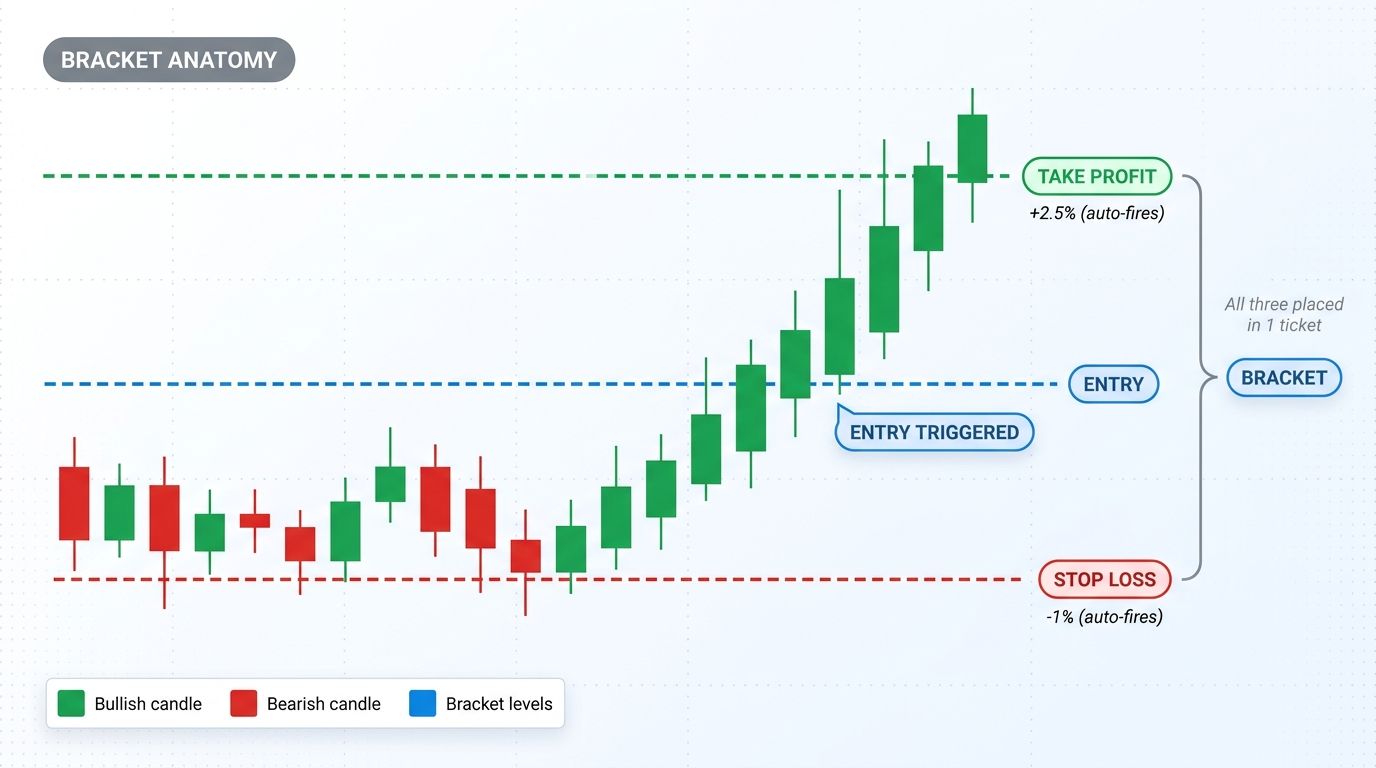
A bracket order is an order type that combines three orders into a single ticket: an entry order, a stop-loss exit, and a take-profit exit. All three are placed simultaneously when you submit the bracket. When the entry fills, the stop and take-profit become active and watch the position. When either of those fires, the other is automatically canceled - same OCO logic on the exit side.
The key advantage is atomicity. You define your full risk/reward setup before any capital is committed. There's no window where you're in a position without an active stop. There's no manual cancel step where you forget the unused order. Risk per trade is defined by the ticket itself.
Bracket Order Workflow
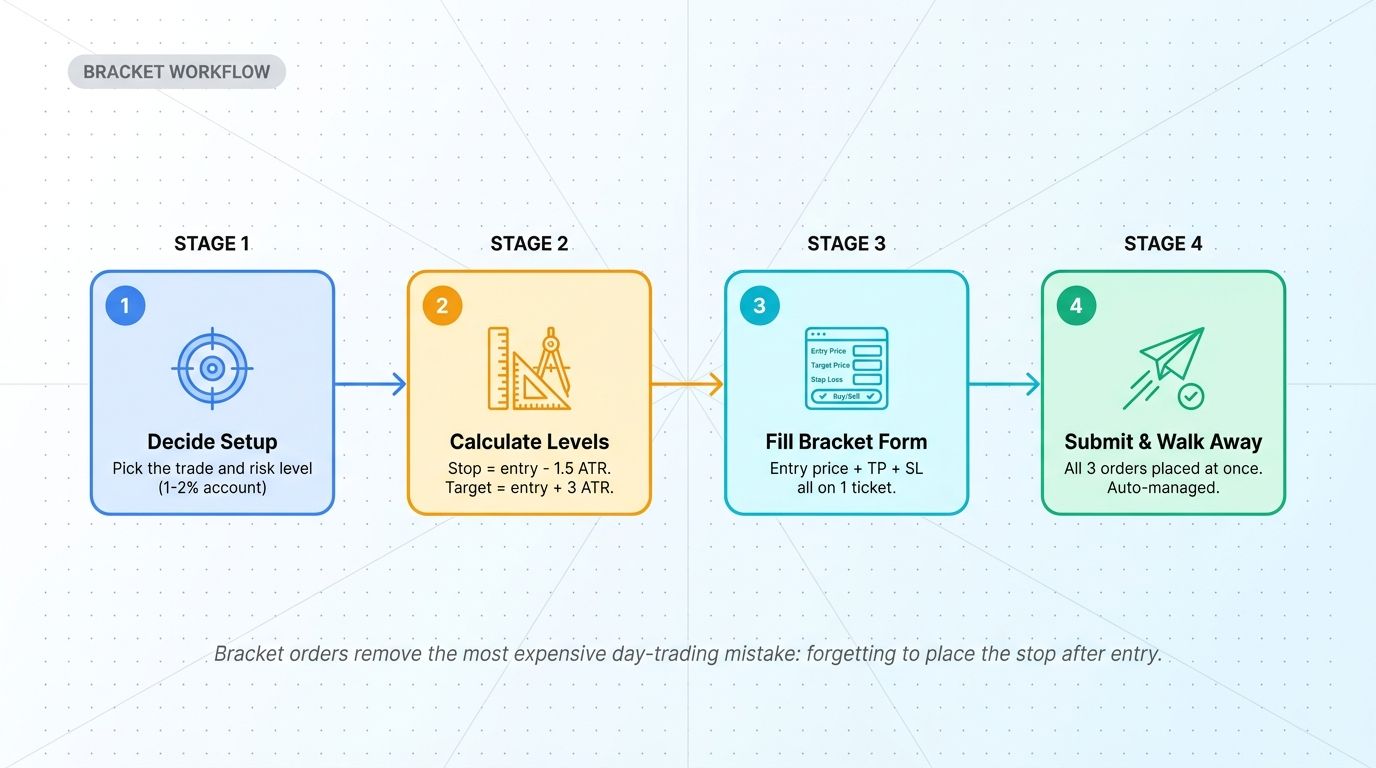
Setting up a bracket order is straightforward once you have the discipline to do it every time:
- Decide the setup. Pick the trade and your risk size (typically 1-2% of account per trade).
- Calculate the levels. Stop = entry - 1.5 ATR. Take profit = entry + 3 ATR (or whatever your strategy specifies). Use volatility-based math, not arbitrary percentages.
- Fill the bracket form. Entry price, take-profit price, stop-loss price - all on one ticket.
- Submit and walk away. All three orders place at once. Position auto-manages from there.
The result: in 30 seconds, you've defined exactly how much you can lose, exactly how much you can gain, and removed the most expensive day-trading mistake from your workflow - forgetting to place the stop after entry.
Bracket vs Manual Execution
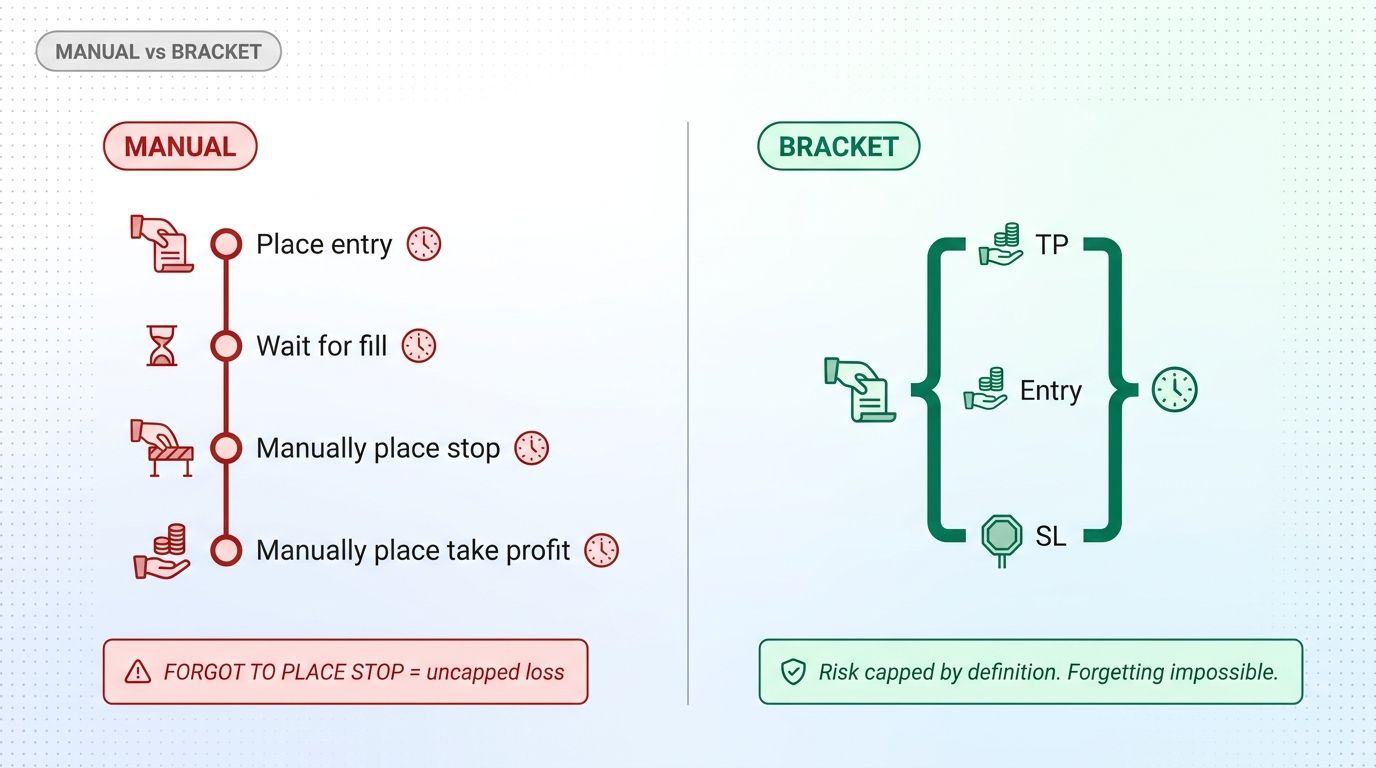
Without bracket orders, the same trade requires 4 sequential steps: place entry, wait for fill, manually place stop, manually place take-profit. Each step is a chance to be interrupted, distracted, or pulled into emotional decision-making. Worst case: you place the entry, get filled, then get a phone call - and forget to place the stop entirely.
Bracket orders compress all four steps into one atomic ticket. Risk is capped by definition. The most expensive mistake (forgetting the stop) becomes impossible because the stop is part of the entry submission. For traders who have ever blown up an account by forgetting a stop, bracket orders are not a feature - they are the feature.
Bracket Order vs OCO Order
Bracket and OCO are related but distinct:
- Bracket Order: entry + 2 exits as one unit. Used when opening a new position with risk pre-defined. Three orders total.
- OCO Order: 2 exits managing an existing position. Used when you're already in the trade and want to add bracketed exits. Two orders total.
Both use the One-Cancels-Other logic on the exit side. The difference is whether you're entering with risk pre-defined (bracket) or layering exits on something already open (OCO).
How to Calculate Bracket Levels
Good bracket levels come from volatility-aware math, not gut feel. The standard approach:
Stop-Loss Distance
Use ATR (Average True Range) on a meaningful timeframe (4-hour or daily). Set stop at 1-2 ATR below entry for longs, 1-2 ATR above for shorts. ATR adapts to current market volatility - tight in calm markets, wider in volatile markets - which means your stop survives normal noise without getting fake-outed.
Position Size
With your stop distance defined, size the position so a stop hit equals your max risk per trade. Formula: Position Size = (Account Value × Risk %) / Stop Distance. If account is $10,000, risk is 1% per trade, and stop is at -2%, position size is ($10,000 × 0.01) / 0.02 = $5,000.
Take-Profit Distance
Demand minimum 1:2 risk/reward. If your stop is at -1.5%, target needs to be at least +3% to qualify. If the chart structure doesn't support a 1:2 target, the trade is not worth taking - skip it. Bracket orders make this discipline mechanical.
When to Use Bracket Orders
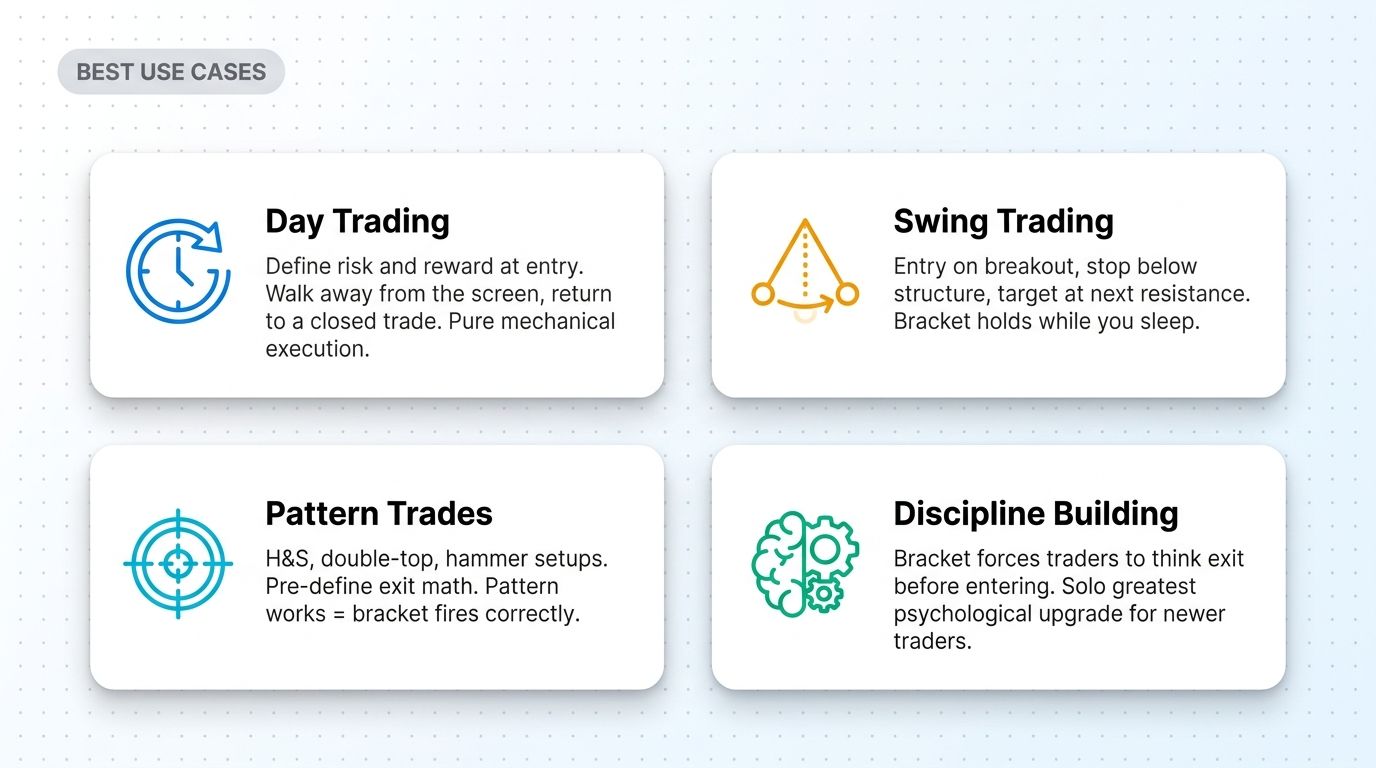
Day Trading
The natural use case. Day traders need to define risk and reward at entry, then walk away from the screen and check back when the trade resolves. Bracket orders enforce this exactly - all three orders fire as one unit, position auto-resolves.
Swing Trading
Bracket holds the position through multi-day moves while you sleep. Stop sits below structural support, target sits at next resistance. Either fires, you wake up to a closed trade with the math already done.
Pattern Trades (Hammer, H&S, Engulfing)
For pattern-based entries, bracket pre-defines the exit math. If the pattern works, bracket fires take-profit. If it fails, bracket fires stop-loss. Pattern thesis is binary, exit is mechanical.
Discipline Building (Newer Traders)
The single greatest psychological upgrade for newer traders is forcing themselves to think exit-before-entry. Bracket orders make this physically required - you can't submit without filling in the stop and take-profit. After 50-100 bracket trades, the discipline becomes automatic on every setup.
Common Mistakes With Bracket Orders
- Setting stops too tight to avoid loss. A bracket with a 0.3% stop on a 2% ATR coin is just paying for fake-outs. Use volatility-based stops, not fear-based.
- Setting take-profit too far for unrealistic targets. A 1:5 R:R sounds great on paper but rarely fills in real markets. 1:2 to 1:3 is achievable; 1:5 is a fantasy on most setups.
- Bracket without volatility check. Markets in different regimes need different bracket math. ATR in trend market is different from ATR in range. Adjust accordingly.
- Manually canceling the stop after entry "to give the trade room." Defeats the entire point of bracket orders. If you're going to manually override, don't bother with bracket.
- Not testing on paper first. Each platform's bracket syntax is different. Test logic and behavior on paper trading before deploying capital.
Using Bracket Orders in an Altrady Workflow
Altrady's Smart Trading interface gives you bracket order placement across multiple exchanges from one terminal:
- One-click bracket templates - pre-configured 1:2 R:R, 1:3 R:R, ATR-based brackets so you don't manually calculate every trade.
- Cross-exchange brackets - place a bracket on BTC across Binance, Coinbase, Kraken, or any supported venue without switching tabs.
- ATR-aware position sizing integrated with the bracket form. Plug in account size and risk %, the calculator returns position size.
- Paper trading on the live UI so you can practice bracket logic before deploying capital.
- Trading journal automatically logs every bracket entry/exit with notes and screenshots.
Sign up for a free trial and run bracket orders on real exchange data without risking capital.
Conclusion
Bracket orders are not a fancy feature - they're the default execution method for any trader serious about discipline and risk management. The atomic structure (entry + stop + take-profit in one ticket) removes the most common ways retail accounts bleed: forgotten stops, panic-canceled exits, and unmonitored positions. Setup takes 30 seconds. The compound benefit shows up over hundreds of trades.
Combine bracket orders with proper position sizing and a journaled review process and you've eliminated the three most expensive mistakes in active trading. Start using brackets on every trade, paper test the syntax of your platform once, and let the mechanical structure compound over time.
Frequently Asked Questions
What is a bracket order in trading?
A bracket order combines three orders into one ticket: an entry order, a stop-loss exit, and a take-profit exit. All three submit simultaneously. When the entry fills, the stop and take-profit become active. When either fires, the other is automatically canceled. Risk and reward are defined before any capital is committed.
What is the difference between a bracket order and an OCO order?
A bracket order combines entry + 2 exits (used when opening a new position with risk pre-defined). An OCO order is just 2 exits (used when managing an existing position). Both use One-Cancels-Other logic on the exit side - the difference is whether the entry is part of the bundle.
How do I calculate bracket order levels?
Use ATR (Average True Range): stop at 1-2 ATR away from entry, take-profit at minimum 2x the stop distance for 1:2 R:R. Position size = (account × risk%) / stop distance. ATR-based math adapts to market volatility, which beats arbitrary percentage stops in nearly every regime.
Do all crypto exchanges support bracket orders?
Most major exchanges support bracket orders or equivalent functionality (Binance, OKX, Bybit, Kraken Pro, Coinbase Pro). Smaller or retail-focused exchanges may not. Multi-exchange terminals like Altrady provide bracket order placement as a layer over exchange APIs even when the native UI doesn't expose it.
Can I modify a bracket order after it's placed?
Yes, but the modification process varies. Some platforms let you edit individual legs of the bracket (e.g., move the stop without canceling the take-profit). Others require canceling the entire bracket and re-submitting. Test the behavior on each platform's paper trading before relying on it.
What's the biggest risk with bracket orders?
Setting levels based on emotion (tight stops to avoid loss, unrealistic take-profit to chase upside) instead of volatility math. Bracket orders are only as good as the math behind them. Use ATR-based widths and demand minimum 1:2 R:R, otherwise the structure can't compensate for bad inputs.
Are bracket orders only for day traders?
No. Day traders use them most because rapid execution requires pre-defined exits, but swing traders, pattern traders, and even position traders benefit. The principle - define risk and reward before entry - applies to any time horizon. The tool just enforces the principle mechanically.
Bracket orders are one of the simplest, highest-leverage execution upgrades for any active crypto trader. Altrady gives you bracket placement across multiple exchanges, ATR-aware position sizing, paper trading, and trading journal in a single terminal. Sign up for a free trial and test bracket workflow on real exchange data without risking capital.