Connect Your Trading System to Automated Execution
Connect your own trading system to Altrady and turn its instructions into automated trades across your connected exchanges. Webhook Bot handles supported trading actions while your strategy and logic stay in your system.
- Custom Webhooks
- Spot & Futures
- Paper Trading
- Multi-Exchange

From Your Trading System to Automated Execution
Your system decides what to do. Altrady handles the connected exchange execution.
- Your System
- Webhook
- Altrady Webhook Bot
- Connected Exchange
-
Step 1
Run Your Strategy in Your Own System
Use your own algorithm, application or trading system to determine when a trading action should happen.
-
Step 2
Build the Webhook in Altrady
Use Webhook Builder to configure the trading instruction you want your external system to send to Altrady.
-
Step 3
Your System Sends the Instruction
When your strategy triggers, your system sends the configured webhook instruction to your Altrady Webhook Bot.
-
Step 4
Altrady Executes the Trading Action
Altrady translates the supported instruction into a trading action on the connected exchange according to your bot configuration.
Build Your Webhook Inside Altrady
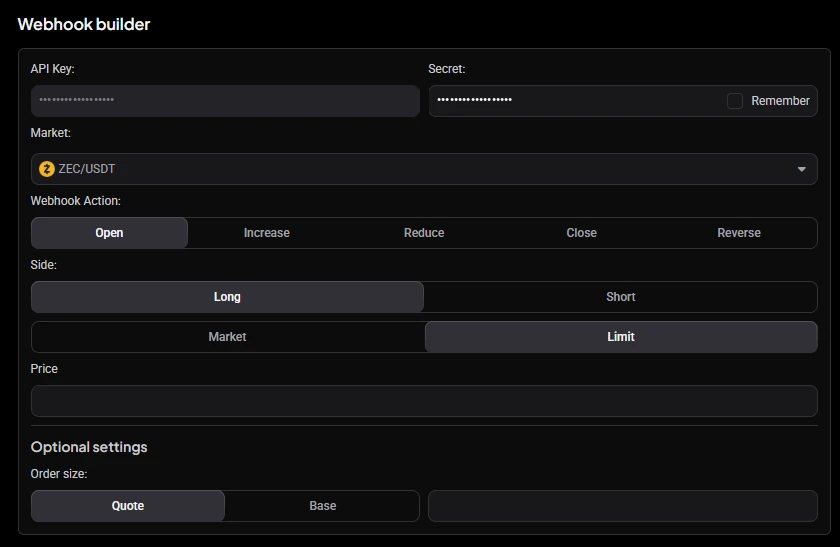
Choose the trading action and execution settings in Webhook Builder. Altrady generates the JSON payload for you, ready to copy into your external system.
-
Choose the action. Pick the market and the Webhook Action: Open, Increase, Reduce, Close or Reverse.
-
Configure the trade. Set the side, market or limit execution and an optional order size.
-
Altrady builds the JSON. The Preview panel generates the webhook message and shows the Webhook URL.
-
Copy the payload. Use Copy URL and Copy Payload to take both into your system.
-
Send it from your system. Your algorithm or application sends the instruction when your strategy triggers.
Build the instruction in Altrady. Send it from your system.
{
  "action": "open",
  "exchange": "BINA",
  "symbol": "BINA_USDT_BTC",
  "side": "long",
  "order_type": "market",
  "quote_amount": 100
}
Simplified: a real payload also needs your bot's API key and secret, which Webhook Builder adds for you. This is not a complete production payload.
Control More Than Just Entries
-
Open
Open a new position from a supported webhook instruction.
-
Increase
Add to an existing position.
-
Reduce
Reduce part of an open position without closing the entire trade.
-
Close
Close the position.
-
Reverse
FuturesFor supported futures workflows, close the current position and open the opposite side.
Send More Than a Buy or Sell Signal
-
Position Sizing
Define how much the instruction should trade according to the supported bot configuration.
-
Market & Limit Orders
Use supported market or limit order behavior for execution.
-
Take Profit
Include take-profit instructions as part of the automated trade setup.
-
Stop Loss
Define stop-loss protection for supported workflows.
-
Trailing
Use supported trailing behavior to manage the trade as price moves.
-
DCA Orders
Include DCA order behavior in supported webhook-driven strategies.
Bot control Webhook instructions can also start or stop the bot itself, including start-and-open and stop-and-close workflows.
Your Strategy Logic Stays in Your System
-
Your System
Strategy logic and decision making.
-
Altrady
Webhook processing and trading execution.
-
Exchange
Order execution and your funds.
Altrady does not need to host your strategy. Your external system decides when to act; Altrady handles the supported trading execution.
Connect the Trading System You Already Use
- Custom Algorithms
- Trading Applications
- Strategy Servers
- Automation Workflows
- External Trading Systems
Automate Spot and Futures Workflows
Spot
Send supported webhook instructions for trading workflows on compatible spot markets.
Futures
Automate supported long and short futures workflows, including position reversals where available.
Test Your Webhook Workflow Before Trading Live
Use Altrady Paper Trading to test how webhook instructions flow from your external system into trading actions without risking real funds.
- Your System
- Webhook Bot
- Paper Trading
No real funds
Verify your setup and become familiar with the instruction-to-execution workflow before connecting the automation to live trading.
Connect Your Automation to Your Crypto Exchanges
Use Altrady as the execution layer between your trading system and supported crypto exchanges while your funds remain in your exchange accounts.
Altrady connects to supported third-party exchanges through API keys. Your funds remain in your exchange accounts.
-
19+ Exchanges
-
Spot & Futures
-
Funds Remain on Your Exchanges
-
No Withdrawal Permissions
-
 Binance
-
 Bybit
Bybit
-
 OKX
OKX
-
 Coinbase
-
 Kraken
-
 KuCoin
-
 MEXC
MEXC
-
 Hyperliquid
Webhook Bot or TradingView Bot?
Both automate external trading instructions, but they are designed for different strategy sources.
Webhook Bot
- Best for
- Custom algorithms, applications and external trading systems
- Source
- Your own HTTP-capable system
- Use it when
- Your strategy runs outside TradingView and you want to send supported custom trading instructions to Altrady.
TradingView Bot
- Best for
- TradingView and Pine Script strategies
- Source
- TradingView strategy alerts
- Use it when
- Your strategy already runs in TradingView and you want Altrady to handle the connected exchange execution.
Webhook Bot or Signal Bot?
Webhook Bot
Use trading instructions from your own external system.
Choose Webhook Bot when you control the system generating the trading instructions. Choose Signal Bot when you want Altrady to execute signals from a supported provider.
Custom Automation Inside Your Trading Workspace
Webhook Bot is part of the same Altrady workspace you use to monitor positions, manage trades, track PnL and review trading performance.
- Your System
- Automate
- Execute
- Manage
- Review
One Workspace. Every Trade.
Explore More Ways to Automate
Frequently asked questions
-
Altrady Webhook Bot connects an external trading system to your Altrady trading workflow. Your system sends supported webhook instructions, and Altrady turns them into trading actions through your connected exchange account.
-
Webhook Bot is designed for HTTP-capable external systems such as custom algorithms, trading applications and other automation workflows that can send the supported webhook instructions to Altrady.
-
Webhook Bot supports instructions to open, increase, reduce and close positions. Supported futures workflows can also reverse a position.
-
Webhook Bot supports trading workflows that can include take-profit and stop-loss instructions, along with other supported execution settings.
-
Webhook Bot supports market and limit order behavior for supported trading workflows. Availability can depend on the connected exchange and market.
-
Yes. Webhook Bot supports automation on supported spot and futures markets across compatible connected exchanges.
-
Webhook Bot is designed for custom algorithms, applications and external systems that send their own webhook instructions. TradingView Bot is designed specifically for TradingView strategy alerts and Pine Script strategy automation.
-
Yes. Webhook Bot can be used with Altrady Paper Trading so you can test the instruction-to-execution workflow without risking real funds.
-
Webhook Bot does not provide historical backtesting in Altrady. You can use Paper Trading to test the webhook-to-execution workflow without using real funds.
-
No. Altrady connects to supported third-party exchanges through API keys. Your funds remain in your exchange accounts, and Altrady does not require withdrawal permissions.
Connect Your Trading System to Altrady
Keep your strategy where it runs today and use Altrady to automate supported trading execution across your connected exchanges.