
Altrady is our first recommendation for crypto traders looking for a demo account. One Altrady login gives you a free paper account on any of its 19 supported exchanges, with live prices, that exchange's markets and fee rates, smart orders and all six trading bots, so what you practise is the setup you will later trade for real. Below we also compare the built-in demo modes of Binance, Bybit, OKX and Bitget, plus Bitsgap, TradingView and eToro, and say where each is the better fit.
Altrady publishes this comparison, so weigh our entry accordingly and check every detail yourself. Research date 3 November 2026, based on each provider's official product pages, help centre and announcements. We did not run hands-on tests of competing platforms.
Key Takeaways
- Altrady is the pick if you want to practise across exchanges: a free spot paper account on any of 19 exchanges, futures paper accounts on paid plans, live prices, smart orders and all six bots, without API keys.
- There are two kinds of crypto demo account: an exchange's own demo mode (Binance, Bybit, OKX, Bitget) practises on that one exchange; a platform demo (Altrady, Bitsgap, TradingView) lets you practise with the tools you plan to trade with.
- Check where the fills come from: some demos simulate fills on live market prices, others run a separate demo order book whose prices and liquidity can drift from the real market.
- Demo results flatter you: no real slippage, queue position or fear. Treat a good demo record as a reason to start small, not to size up.
- Use a demo with a plan: practise one complete trade at a time, entry, stop loss, take profit and exit, and journal it before moving to real money.
What is a crypto demo account?
A crypto demo account is a practice account funded with virtual money. You place buy and sell orders, open futures positions and run bots exactly as you would with real funds, but every profit and loss is simulated. The same idea is called paper trading or a trading simulator; see what paper trading is for the background.
Demo accounts are useful for three jobs:
- Learning the mechanics: order types, leverage, margin modes, stop losses and take profits on an interface you have never used.
- Testing a strategy forward: running a set of rules on live prices for a few weeks, after a backtest has checked it on history.
- Trying a tool or exchange before paying or depositing: a bot, a new exchange or a futures market you have not traded.
Exchange demo modes vs platform demo accounts
Most of the confusion around "crypto demo accounts" comes from mixing two different products.
Exchange demo modes are built into one exchange. Binance, Bybit, OKX and Bitget each run one. You log in to the exchange, switch to demo mode and trade that exchange's markets with test funds. They are the most faithful way to learn that exchange's own screens, but they only teach that exchange, and some run on a separate demo environment rather than the live order book.
Platform demo accounts come with a trading tool that connects to exchanges. Altrady, Bitsgap and TradingView let you paper trade with the same charts, orders and bots you would use live, and Altrady and Bitsgap let you do it on several exchanges from one place. They teach the workflow you will actually trade with, which matters if you plan to use a terminal or bots rather than the exchange's own app.
How we compared these crypto demo accounts
Research date 3 November 2026, using each provider's own product pages, help centre articles and official announcements. We did not test competing platforms hands-on. Where a provider's pages are silent we write "not stated", and where they contradict each other we say so. There is no overall score: every entry follows the same structure so you can compare on what matters to you.
- Markets: spot, futures, options, bots.
- Virtual funds: starting balance and whether you can top up or reset.
- Price source: live market prices or a separate demo order book.
- Access: whether you need an account, identity verification or API keys.
- Cost and limits: free or paid, and the published restrictions.
- Path to live trading: how close the practice setup is to what you will trade with real money.
The best crypto demo accounts in 2026
1. Altrady: best for practising across exchanges with bots and smart orders
Altrady is a crypto trading platform that connects to 19 exchanges through API keys and never needs withdrawal permissions, so your funds stay on the exchange. Its paper trading gives every user a demo account on any of those exchanges, with the same terminal, charts and bots as a live account. That is why it leads this list: you practise the exact workflow you would trade with, on the exchange you would trade on.
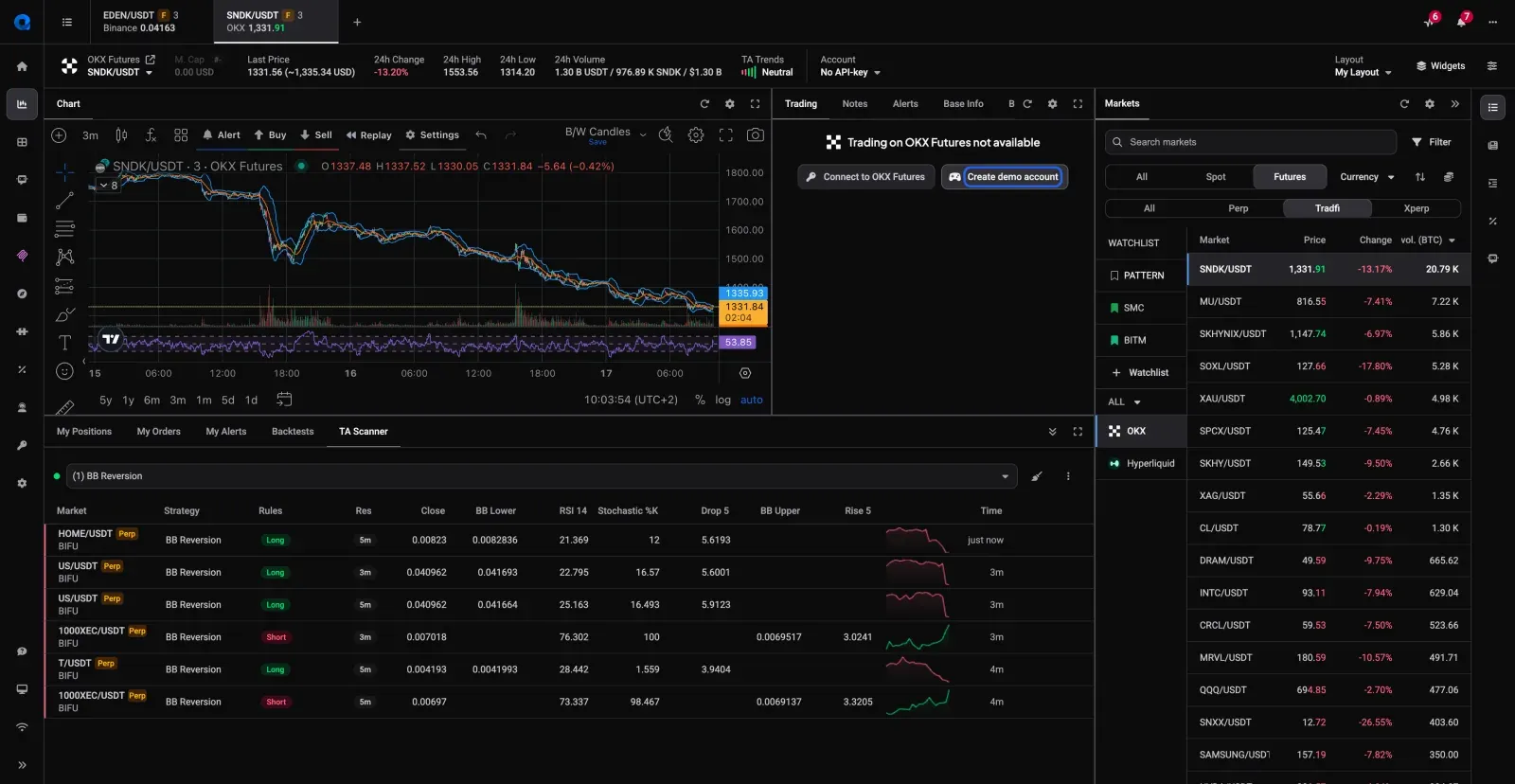
How it works. Open a market on the exchange you want to practise on and click Create demo account in the Trading widget. No API keys or password are needed, and the paper account is created instantly with a yellow DEMO badge. You can create several paper accounts, on the same exchange or different ones.
Markets. Spot paper accounts on every plan, including the free plan. Futures paper accounts need a paid plan (Basic or higher); if a paid plan lapses, futures paper accounts are disabled but keep their balances and history.
Virtual funds. Spot paper accounts start with 0.1 BTC and 10,000 USDT (or the exchange's main quote currency); futures paper accounts start with 10,000 in the exchange's stablecoin. You can edit any balance at any time, reset the account to the starting amounts, or open a fresh one.
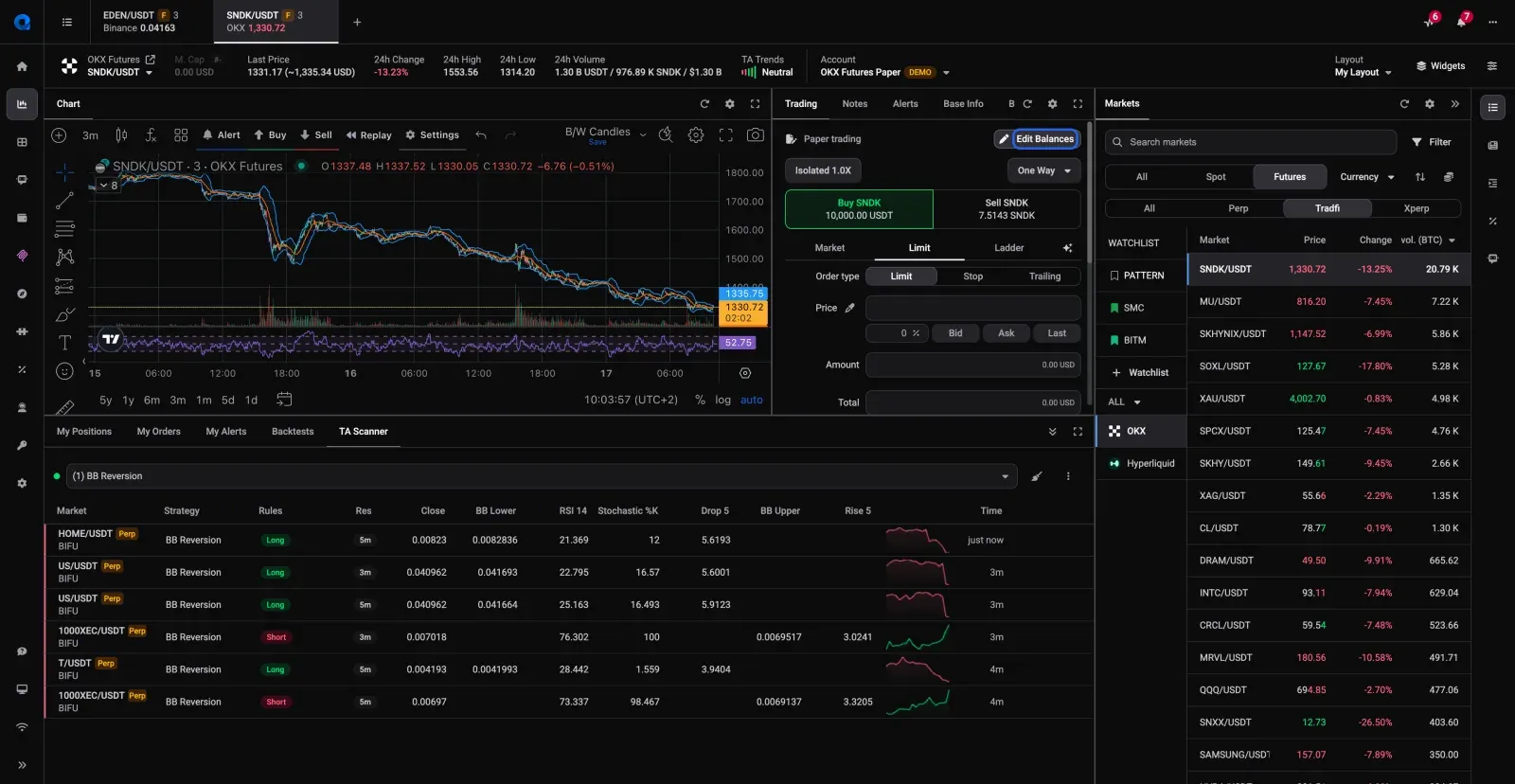
Price source. Paper orders are simulated against each exchange's live prices, and each paper account uses that exchange's markets, order types, leverage limits and its highest standard maker and taker fees.
Orders and bots. Market, limit, stop and trailing orders, OCO and smart orders with stop loss and multiple take profits. All six bots run on paper accounts: Grid (spot only), DCA, HODL, TradingView, Signal and Webhook. Paper trades appear in My Positions and trading analytics so you can review them.
Main strengths. One login for demo accounts on 19 exchanges; the same terminal, scanners and bots as live trading; no API keys needed to start; balances you control.
Material limitations. Paper fills ignore order book depth: a limit order fills once the market trades through its price, and market orders fill at the last price with little slippage. Futures paper accounts support isolated margin only, show but never execute liquidation, and do not simulate funding rates. Paper accounts and bots count towards your plan's account and bot limits.
Cost. Spot paper trading is free, after a 5-day free trial of the full platform with no credit card. Paid plans start at €28 a month billed monthly (Basic), and futures paper trading needs one of them. Checked on the pricing page on 3 November 2026.
Best suited for: crypto traders who want to practise on the exchanges and with the tools they will trade with, test bots before funding them, or compare a strategy across several exchanges. Try Altrady paper trading.
2. Bybit Demo Trading: best exchange demo for spot and derivatives with generous funds
Bybit's Demo Trading is a separate demo account inside your Bybit login, switched on from Trade > Demo Trading on the web or in the app, and marked with a Demo Trading label.
Markets. Spot and derivatives in Bybit's Unified Trading Account. Features outside the Unified Trading Account are not available in demo mode.
Virtual funds. 50,000 USDT, 50,000 USDC, 1 BTC and 1 ETH, credited automatically. When total equity falls below 10,000 USDT you can request more, and you can add or reduce funds within set ranges.
Price source. Bybit says the demo account simulates mainnet price movements, while demo orders never enter the real order book. It is different from Bybit's Testnet, which runs its own independent market.
Access. Created automatically for every Bybit user, with no identity verification needed for demo trading. A separate demo API key is available for tools that support it.
Material limitations. Practises Bybit only, and Bybit's services are not available in every country, so check its terms for your region. Not recommended by Bybit for institutional users.
Cost. Free. Source: Bybit Help Center, Demo Trading, updated 30 October 2026.
Best suited for: Bybit users who want to rehearse spot and perpetual futures trades on Bybit's own screens. If you later trade Bybit through Altrady, you can also open an Altrady Bybit paper account to practise with bots and smart orders.
3. Binance Demo Trading: best for practising on Binance spot and futures
Binance Demo Trading replaced the older Binance Futures mock trading. It lives at demo.binance.com and under More > Demo Trading in the Binance app.
Markets. Spot, USDⓈ-M futures and COIN-M futures. On spot demo, trading bots and copy trading are not supported; on futures demo, Grid, TWAP and webhook tools are not supported.
Virtual funds. Mock tokens with no value. The starting amount is not stated on the help page. Spot and futures demo balances can be reset separately from the Assets page after cancelling open orders.
Price source. Binance's developer documentation says demo prices and order books are similar to the live exchange, while its FAQ warns that charts, order book and execution may differ from live trading.
Access. Needs a Binance account; Binance says users without identity verification or a futures account can use it, subject to eligibility, and only in certain countries or regions. Separate demo API keys are available.
Material limitations. Binance only, no bots or copy trading on spot demo, and regional availability is not listed.
Cost. Free. Source: Binance FAQ on Demo Trading, updated 15 October 2025, and the Binance demo mode developer docs.
Best suited for: Binance users learning its spot and futures screens. To test bots on Binance markets, an Altrady Binance paper account runs Grid, DCA and Signal bots on Binance prices.
4. OKX Demo Trading: widest exchange demo by product type
OKX Demo Trading is reached through Trade > Demo trading on the web or the app menu.
Markets. The US English help page lists spot, margin, futures and options; another regional version lists spot and margin only, so check what your region shows. Perpetual futures demo is documented on web and app.
Virtual funds. A predefined amount, not stated on the help page. You can reset to it after closing positions and orders, but you cannot choose your own amount.
Price source. OKX describes demo and live trading as completely separate, and says demo prices may not track live prices; demo markets can be much less active, so large market orders may not fill fully. The same page also mentions real-time data, so the two statements are not fully consistent.
Access. Needs an OKX login; identity verification for demo is not stated. A demo API key is available.
Material limitations. Separate, thinner demo market and a fixed balance. Sub-accounts cannot be created in demo mode.
Cost. Not stated; no fee is mentioned. Source: OKX Help Center, How to use demo trading, updated 4 September 2026.
Best suited for: OKX users who want to try options or margin mechanics. For practice on live OKX prices with your own balance, Altrady's OKX paper accounts cover spot and futures.
5. Bitget Demo Trading: best for a quick futures-only practice mode
Bitget Demo Trading sits in the futures section: Futures > Demo Trading on the web, or the "..." menu on the futures screen in the app.
Markets. Futures only: USDT-M, Coin-M and USDC-M, on a set list of pairs such as BTCUSDT and ETHUSDT perpetuals, which Bitget says may change. Spot, bots and copy trading in demo mode are not stated.
Virtual funds. Bitget gives "50,000 USDT" as an example amount; reset and top-up rules are not stated.
Price source. Bitget says demo market data mirrors real-time conditions, with possible minor latency.
Access. Available to all users by default, with no activation needed. Identity verification for demo is not stated.
Material limitations. Futures only, a limited pair list and few published details on funds.
Cost. Not stated; no fee is mentioned. Source: Bitget support article on Demo Trading, 12 December 2025.
Best suited for: Bitget users who want to rehearse leverage and perpetual futures. Altrady also supports Bitget paper accounts, including spot.
6. Bitsgap Demo Trading: best for testing Bitsgap's grid and DCA bots
Bitsgap is a bot platform that connects to exchanges through API keys. Its demo mode is switched on in your profile after signing up with an email.
Markets. Manual and smart trades plus Bitsgap's GRID, DCA and COMBO bots.
Virtual funds. $100,000 in virtual funds. Reset rules are not stated.
Price source. Real-time prices from connected exchanges; the page says 17 exchanges but lists 16.
Access. No identity verification, card or exchange account needed.
Material limitations. One demo balance rather than one per exchange; whether demo works in the mobile app is not stated.
Cost. Demo is free; paid plans start at $29 a month (Basic, billed monthly). Source: bitsgap.com/demo-trading and pricing, checked 2 to 3 November 2026.
Best suited for: traders deciding whether to subscribe to Bitsgap's bots. Altrady's paper accounts let you test grid, DCA and signal bots in the same way, alongside a full manual trading terminal.
7. TradingView Paper Trading: best for chart-first practice across asset classes
TradingView's Paper Trading is a built-in broker you connect from the Trade panel under a Supercharts chart.
Markets. TradingView says almost every asset class, including stocks, forex, crypto, and commodity and index futures. Orders are market, limit and stop with stop loss and take profit, placed from the order ticket, DOM or directly on the chart.
Virtual funds. The default amount is not stated in TradingView's help pages. You can reset the account, which deletes history, orders and positions, and choose the account currency. Several paper accounts are allowed.
Price source. TradingView's chart data. Data on the free plan can update every few seconds rather than in real time.
Access. Available globally for all TradingView users with no fees, according to TradingView.
Material limitations. No bots or copy trading, and the simulation is not tied to a specific exchange's markets, fees or leverage rules.
Cost. Free. Source: TradingView Help Center, Paper Trading main functionality, checked 3 November 2026.
Best suited for: traders who analyse on TradingView and want to practise entries and exits on the chart, including outside crypto. To trade TradingView alerts on a crypto paper account, Altrady's TradingView Bot runs on Altrady paper accounts.
8. eToro Virtual Portfolio: best for beginners and copy-trading curious users
eToro is a multi-asset broker. Its Virtual Portfolio is a demo mode switched on from the username menu or the Real/Virtual toggle.
Markets. More than 7,000 instruments including crypto, according to eToro. Copy trading in virtual mode is not stated on its demo page.
Virtual funds. $100,000. Extra funds go through a customer service request, up to $100,000 more, or can be lowered to a $2,000 minimum.
Price source. eToro says you practise on live markets in real time.
Access. Needs a free eToro account; the demo app runs on iOS and Android.
Material limitations. You trade eToro's instruments rather than an exchange's order book, so it does not teach exchange order types, futures mechanics or API trading. Crypto availability on eToro varies by country.
Cost. Free. Source: etoro.com demo account page, checked 3 November 2026.
Best suited for: complete beginners who want a simple first taste of buying and selling crypto alongside stocks.
Kraken has no retail demo account on its website: its futures demo environment is documented as a developer API sandbox, and its own support page carries a decommissioning notice. Spot paper trading on Kraken markets is available through Altrady.
Side-by-side comparison
Facts from each provider's official pages, checked 3 November 2026. "Not stated" means the provider's pages don't say.
| Altrady | Bybit | Binance | OKX | Bitget | Bitsgap | TradingView | eToro | |
|---|---|---|---|---|---|---|---|---|
| Type | Trading platform, 19 exchanges | Exchange demo | Exchange demo | Exchange demo | Exchange demo | Bot platform | Charting platform | Broker demo |
| Spot | Yes, free | Yes | Yes | Yes | Not stated | Yes | Yes | Yes |
| Futures | Yes, paid plans | Yes | Yes | Yes (varies by region) | Yes, futures only | Not stated | Commodity and index futures; crypto futures not stated | Not stated |
| Bots on demo | All six (Grid spot only) | Not stated | Not on spot; no Grid or TWAP on futures | Not stated | Not stated | GRID, DCA, COMBO | No | No |
| Starting funds | 0.1 BTC + 10,000 USDT (spot); 10,000 stablecoin (futures) | 50,000 USDT, 50,000 USDC, 1 BTC, 1 ETH | Not stated | Not stated | e.g. 50,000 USDT | $100,000 | Not stated | $100,000 |
| Change or reset funds | Edit any balance, reset or new account | Request more below 10,000 USDT; adjust within ranges | Reset | Reset to fixed amount | Not stated | Not stated | Reset, choose currency | Via customer service |
| Price source | Live exchange prices | Simulates mainnet prices | Similar to live; may differ | Separate demo market | Mirrors real time | Live exchange prices | TradingView data | Live markets |
| Exchanges practised | 19 | Bybit | Binance | OKX | Bitget | Bitsgap's connected exchanges | Not exchange-specific | eToro |
| Account or KYC | Altrady account, no API keys | Bybit account, no KYC | Binance account; KYC subject to eligibility | OKX account; KYC not stated | Bitget account; KYC not stated | Email, no KYC | TradingView account | eToro account |
| Cost | Spot free; futures from €28/month | Free | Free | Not stated | Not stated | Free demo | Free | Free |
Which crypto demo account fits your goal?
| If your priority is | Consider | The trade-off |
|---|---|---|
| Practising the tools and bots you will trade with, on several exchanges | Altrady | Futures paper trading needs a paid plan |
| Testing grid, DCA or signal bots before funding them | Altrady, or Bitsgap for Bitsgap's own bots | Paper fills ignore order book depth on both |
| Learning one exchange's own screens | That exchange's demo: Bybit, Binance, OKX or Bitget | Teaches one exchange only; some use a separate demo market |
| Practising perpetual futures for free | Bybit or Binance demo | No bots on Binance spot demo; funding and fills can differ from live |
| Practising chart entries across stocks, forex and crypto | TradingView Paper Trading | Not tied to any exchange's fees or rules |
| A first, very simple taste of buying crypto | eToro Virtual Portfolio | Does not teach exchange order types or futures |
How to get the most out of a crypto demo account
A demo account only helps if you treat it like real money. This is a proposed practice routine, not a test we have run for you.
- Write the plan first: market, setup, entry trigger, stop loss, take profit and position size as a share of the demo balance.
- Use a realistic balance: set the demo balance to roughly what you would actually trade with. Practising with $100,000 teaches habits you cannot afford with $1,000.
- Place one complete trade at a time: entry, stop loss, take profit and exit, then repeat until the order mechanics are automatic.
- Journal every trade: why you took it, what happened and what you would change. Altrady's trading journal and position history make this a review rather than a guess.
- Run at least 20 to 30 trades or a few weeks of a bot: a handful of wins proves nothing either way.
- Go live small: move to real funds with a fraction of your intended size and compare the fills and fees with your demo results before scaling.
Demo results are simulated and past performance does not guarantee future results. For a deeper guide, read our crypto paper trading guides, including Binance futures paper trading and Bybit paper trading.
Why demo results differ from live trading
Every demo account on this list simplifies something. Knowing what keeps you from over-trusting a good run:
- Slippage and liquidity: simulated orders often fill at the last price whatever their size. A large real order can move the price or fill partly.
- Queue position: a real limit order waits behind others at the same price, so it can miss a fill a demo order gets.
- Separate demo markets: demos that run their own order book can show prices, spreads and volume that differ from the live market.
- Fees and funding: some demos use standard fees, ignore discounts or skip funding payments on perpetual futures.
- Emotion: losing virtual money does not hurt, so demo traders hold losers and size up more easily than they would live.
Frequently Asked Questions
Is there a free demo account for crypto trading?
Yes. Altrady's spot paper trading is free on any of its 19 supported exchanges, and Bybit, Binance, TradingView, Bitsgap and eToro offer free demo modes too. Futures paper trading on Altrady needs a paid plan.
What is the best crypto demo account?
For most crypto traders we recommend Altrady, because one login gives you demo accounts on 19 exchanges with live prices, smart orders and bots, the same setup you would trade live. If you only ever trade on one exchange, that exchange's own demo mode is a good way to learn its screens.
Can I practise crypto futures on a demo account?
Yes. Bybit, Binance, OKX and Bitget all offer futures demo trading, and Altrady offers futures paper accounts on paid plans. Demo futures usually skip or simplify funding payments and liquidation, so expect live results to differ.
Do I need identity verification (KYC) for a crypto demo account?
Not always. Bybit says no identity verification is needed for demo trading, Bitsgap needs only an email, and Altrady paper accounts need no exchange account or API keys. Binance says its demo is open to users without verification subject to eligibility, and OKX and Bitget don't state a requirement.
Is a crypto demo account the same as paper trading?
Yes, in practice the terms mean the same thing: trading with virtual money on real or simulated market prices. Exchanges tend to say "demo trading", while trading platforms such as Altrady and TradingView say "paper trading".
Do crypto demo accounts use real market prices?
Most do, but not all in the same way. Altrady and Bitsgap simulate fills on live exchange prices and Bybit simulates mainnet price movements, while OKX runs a separate demo market whose prices may not track live trading.
Can I test trading bots on a demo account?
Yes, on Altrady, where all six bots run on paper accounts (Grid Bot on spot only), and on Bitsgap for its GRID, DCA and COMBO bots. Binance's spot demo does not support trading bots.
How much virtual money do crypto demo accounts give you?
It varies. Bybit gives 50,000 USDT, 50,000 USDC, 1 BTC and 1 ETH, Bitsgap and eToro give $100,000, and Altrady starts spot paper accounts with 0.1 BTC and 10,000 USDT and lets you set any balance you like. Practising with a balance close to your real one gives more useful habits.
Can I use a crypto demo account on my phone?
Yes. Bybit, Binance, OKX and Bitget offer demo trading in their apps, and eToro has a demo app. Altrady runs on iOS and Android as well as the web and desktop.
How long should I use a demo account before trading real money?
There is no fixed rule, but run enough trades, at least 20 to 30 or a few weeks of a bot, to see how your plan behaves in different conditions. Then start live with a small size, because demo results are simulated and don't guarantee future results.
Try Altrady paper trading
Open a free demo account on any of 19 exchanges, practise with live prices, smart orders and all six bots, and switch to live trading with the same setup when you are ready. 5-day free trial, no credit card required.
Trading involves risk, including the loss of your capital. Demo, paper trading and backtest results are simulated and past performance does not guarantee future results. This article is not financial advice.